
This guide is for OneDrive Personal (Microsoft 365 Family or Personal) only, do not use this guide if you have a Microsoft work or school account.
NOTE: If you have OneDrive Personal installed on your computer, you will see a white cloud on the bottom right of the taskbar, otherwise, if you have OneDrive work or school installed, it is a blue cloud.
When someone shares a folder and gives you edit permissions to it, you can add the shared folder to your own OneDrive to make it easier to edit and work with the folder and its contents.
Then, if you sync the folder to your Windows or Mac computers running the OneDrive app, you can work with the folder offline and it also makes it easier to work on the files.
Shared folders added to your OneDrive do not use any of your OneDrive storage space, they only count against the folder owner’s storage space.
You can also access shared folders from your Shared list on OneDrive.com or in the OneDrive mobile apps and you will be able to copy, move, edit, rename, share, and delete anything in the folder.
Follow these steps to add a shared folder to your OneDrive (Personal):
1. You will need to firstly sign in to OneDrive on your browser https://onedrive.com/ or right click on the OneDrive symbol on the bottom right hand corner of the taskbar, then select View Online
NOTE: You can only do this in the web portal of OneDrive, not via the OneDrive app
2. In the OneDrive navigation pane, click Shared and folders you can add to your OneDrive are marked "Can edit"
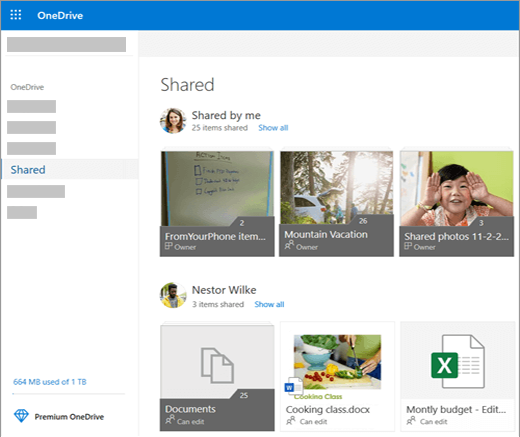
3. Locate the folder you want to add, then click the circle (top right of the box) to select the folder and then click on Add to my OneDrive
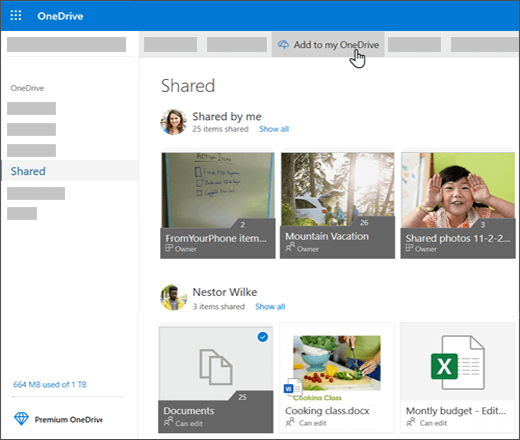
4. You will then be prompted to add this to the OneDrive app on your device which you need to approve
IMPORTANT: The Add to my OneDrive option isn’t available when:
- You’re signed in with a work or school account.
- You’ve already added the folder to your OneDrive, or you have more than one folder selected. (You can’t add multiple folders at the same time.)
- The item you’re trying to add isn’t a folder. (Add to my OneDrive isn’t available for individual files or for collections of files such as albums.)
Comments
0 comments
Please sign in to leave a comment.